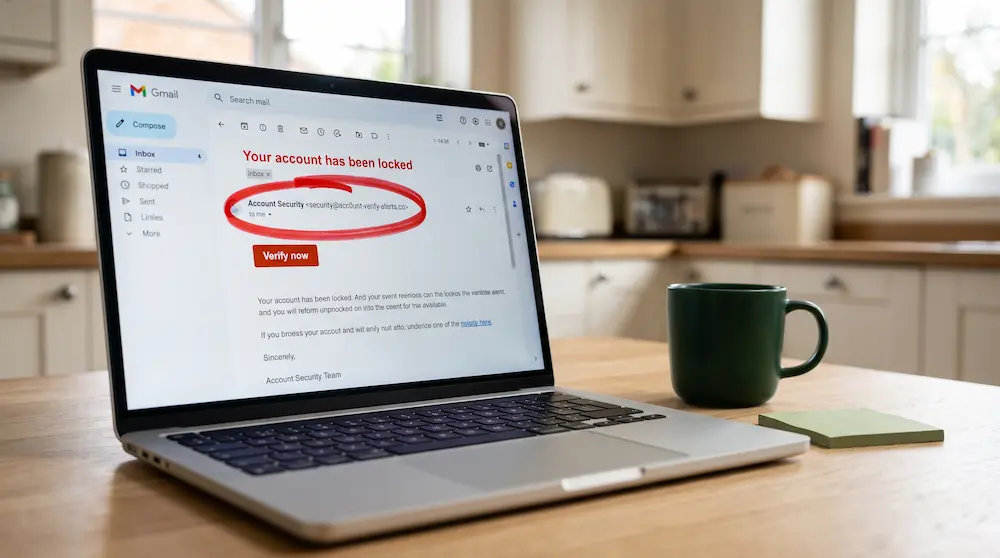
A phishing email is a fake message pretending to be from someone you trust, like your bank, Amazon or HMRC, to get you to click a link or hand over details. The quickest checks are the sender’s actual email address, where the link really goes, and whether it’s rushing you. If in doubt, don’t click. Go to the company’s website or app yourself instead.
What is a phishing email?
It’s an email written to trick you. The scammer copies the look of a real company (logo, colours, the lot) and gives you a reason to act fast. Your parcel’s stuck. Your account’s been locked. You’re owed a refund.
The link takes you to a fake website that looks like the real one. Anything you type in there, whether that’s a password, card number or date of birth, goes straight to the scammer.
They’re getting harder to spot. A few years ago you could rely on bad spelling. Now plenty of them are written perfectly, so you need better checks than “does it look a bit off?”
7 signs an email is a scam
1. The sender’s address doesn’t match
The name might say “Amazon” but the actual address is something like amzn-support@account-help247.com. On a computer, click the sender’s name to see the full address. On a phone, tap the name at the top of the email.
Real companies use their own domain. Amazon emails come from addresses ending in amazon.co.uk or amazon.com, not a random string of words.
2. The link goes somewhere odd
On a laptop, hover your mouse over the link without clicking. The real address pops up in the bottom corner of the screen. On a phone, press and hold the link and it’ll show you where it goes.
If the email says it’s from your bank but the link goes to a site you’ve never heard of, that’s your answer.
3. It’s in a hurry
“Act within 24 hours or your account will be closed.” Scammers want you panicking, because panicked people don’t check things. Genuine companies rarely give you a ticking clock by email.
4. It doesn’t use your name
“Dear Customer” or “Dear user” is a common giveaway. Your bank knows your name. Not every scam gets this wrong, though, so don’t rely on it alone.
5. It asks for things a real company wouldn’t
No bank will ever email you asking for your full password, PIN or the code they’ve just texted you. If an email asks for any of those, it’s a scam. Every time.
6. There’s an unexpected attachment
An “invoice” for something you didn’t buy, or a “delivery note” from a courier you weren’t expecting. Attachments can carry viruses. Don’t open them unless you know exactly who sent it and why.
7. It’s too good to be true
A tax refund you didn’t ask for. A prize from a competition you never entered. A £500 voucher just for filling in a survey. You know the rest.
What should I do if I get a phishing email?
- Don’t click any links or open attachments.
- Forward it to report@phishing.gov.uk. That’s the National Cyber Security Centre’s reporting address, and they take down the scam websites.
- Delete it.
- If you’re worried it might be real, log in to your account the way you normally would (through the app or by typing the web address yourself) and check there.
What if I’ve already clicked the link?
Don’t panic, and don’t feel daft. These emails are made by people whose full-time job is fooling others.
- If you typed in a password, change it straight away, and change it anywhere else you use the same one.
- If you entered card or bank details, call your bank using the number on the back of your card. You can also dial 159 from most UK phones to get through to your bank safely.
- Report it to Report Fraud at reportfraud.police.uk or call 0300 123 2040. Report Fraud replaced Action Fraud in December 2025.
- If you downloaded something, run a full virus scan, or get someone to look at the device for you.
Frequently asked questions
Can you get hacked just by opening a phishing email?
Almost never. Opening and reading the email is very unlikely to do anything on its own. The risk comes from clicking links, opening attachments or replying with details.
Where do I report a phishing email in the UK?
Forward it to report@phishing.gov.uk, run by the National Cyber Security Centre. If you’ve lost money or shared details, also report it to Report Fraud on 0300 123 2040.
Why am I getting so many scam emails?
Your email address has probably turned up in a data breach somewhere, or been guessed. It’s very common and doesn’t mean you’ve done anything wrong. A good spam filter and a password manager help a lot.
Is it safe to unsubscribe from scam emails?
No. Clicking “unsubscribe” on a scam just confirms your address is real. Mark it as spam or junk instead.
Not sure about an email?
If you’re in Milton Keynes and something’s landed in your inbox that doesn’t feel right, give me a ring and I’ll help you check it. If you’ve already clicked, a scam and virus clean-up is £75: I’ll check your laptop or phone, change your important passwords and lock your accounts down, at home or remotely.