
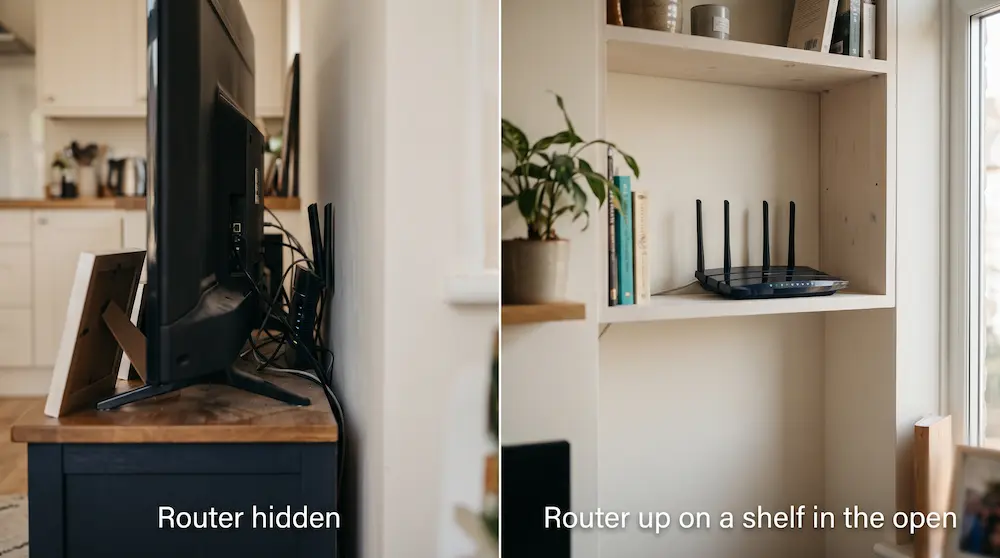
Put your router somewhere central, high up and out in the open: on a shelf in the middle of the house is ideal. Keep it away from thick walls, mirrors, fish tanks, microwaves and the inside of cupboards. If you can’t move it far enough, a mesh Wi-Fi system will usually do more than a cheap plug-in extender.
Why does router placement matter so much?
Wi-Fi signals spread out from the router in every direction, a bit like light from a bare bulb. Every wall, floor and big object in the way weakens the signal. Put the router in a corner of the house and half its signal goes out into the garden.
In plenty of homes the router ends up by the front door, because that’s where the phone or broadband line comes in. It’s about the worst spot it could be, and it’s why the back bedroom gets nothing.
The best place for your router
- Central. As close to the middle of your home as the cable allows.
- High up. On a shelf or the top of a bookcase, not on the floor. Signals travel down and out better than up.
- In the open. Not inside a cupboard, a TV cabinet or behind the sofa.
- Upright. If it has a stand or aerials, use them the way they came.
If the line comes in at the front of the house, ask your broadband provider about moving the master socket, or use a longer cable to get the router further in. A long network cable costs a few pounds.
What to keep your router away from
- Microwaves and baby monitors. Some use the same frequencies as Wi-Fi and can cause interference.
- Mirrors and fish tanks. Glass with a metal backing reflects signal, and water soaks it up.
- Big metal objects. Fridges, radiators and metal filing cabinets all block the signal.
- Thick walls. Older brick, chimney breasts and anything with foil-backed insulation are signal killers.
Quick fixes worth trying first
- Restart the router. Turn it off at the wall, count to 30, turn it back on. Give it five minutes to settle.
- Check the speed you’re paying for. Run a test at speedtest.net, standing right next to the router. If it’s way below your package, the problem is the line, not the Wi-Fi, so ring your provider.
- Plug in what doesn’t move. A smart TV or games console sitting near the router will be faster and more reliable on a network cable, and it frees up Wi-Fi for everything else.
- Ask for a newer router. If yours is more than about five years old, your provider may swap it for free or cheap. Newer ones handle lots of devices much better.
Wi-Fi extender or mesh system?
A plug-in extender repeats the signal from your router. They’re cheap, but they often halve your speed and create a second network you have to keep switching between. They work best for one problem room that’s not too far from the router.
A mesh system uses two or three units placed around the house that work together as one network. Your phone moves between them without you noticing. For bigger homes, three-storey townhouses or houses with thick walls, mesh is usually the better buy. Some broadband providers rent them out monthly.
Frequently asked questions
Should my router be upstairs or downstairs?
In a two-storey house, a high shelf downstairs in the middle of the house usually covers both floors best. If most of your use is upstairs (home office, kids’ bedrooms), putting it upstairs can help.
Can my neighbours’ Wi-Fi slow mine down?
It can, especially in flats and terraces where lots of routers are close together. Most modern routers pick the clearest channel automatically. Restarting yours can prompt it to choose a better one.
Do Wi-Fi extenders actually work?
They can, for a single room near the edge of your signal. If you’ve got patchy Wi-Fi in several rooms, mesh is normally worth the extra money.
How do I know if the problem is my Wi-Fi or my broadband?
Test the speed next to the router, ideally with a laptop plugged in by cable. If it’s fast there but slow in other rooms, it’s a Wi-Fi coverage problem. If it’s slow everywhere, it’s the broadband line.
Still got dead spots?
I help homes across Milton Keynes get Wi-Fi into every room, whether that’s moving the router, setting up mesh or running a cable to the TV. A Wi-Fi sort-out is £65, and we’ll work out what you actually need before you spend anything on kit.